Appearance
iOS 개발 가이드
iOS에서 모바일 신분증 App2App 연동을 구현할 때 필요한 URL 스킴 방식의 흐름과 예제 코드를 정리했어요. 앱 설치 확인부터 M200 요청, 앱 호출, VP 제출까지 단계별로 따라 할 수 있어요.
1. URL scheme indirect mode
모바일 신분증 앱 설치 여부 확인
Info.plist의Queried URL Schemes항목에 다음을 추가해요
| 구분 | 운영/개발 | 테스트베드 |
|---|---|---|
| Schemes | MobileID | tMobileID |
| Bundle ID | kr.go.mobileid | kr.go.mobileid.tbe |
| Universal Link | 사용 가능 | 준비 중 |
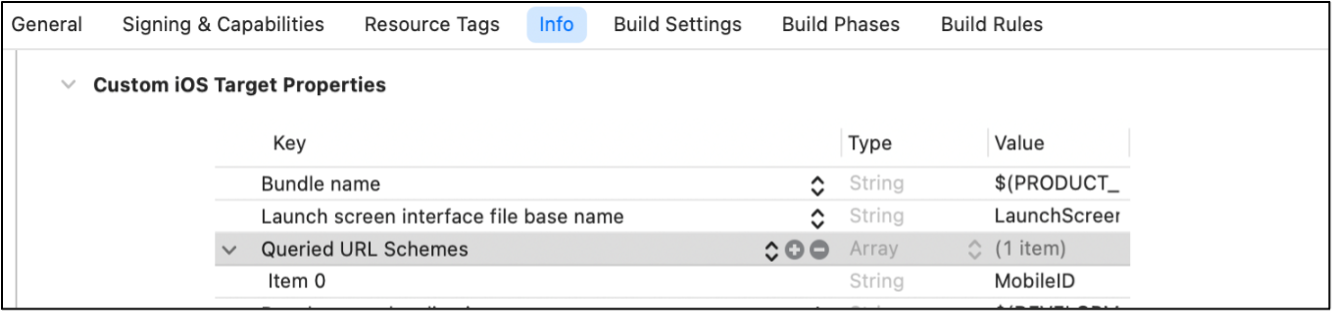
앱 설치 여부 확인 예시
swift
static func canAppOpen(schemes: String) -> Bool {
    if let appUrl = URL(string: "\(schemes)://") {
        return UIApplication.shared.canOpenURL(appUrl)
    }
    return false
}
앱 호출 예시
swift
static func appOpen() {
    if CommonUtility.getAppOpen(schemes: "MobileID") {
        if let appUrl = URL(string: "MobileID://") {
            if #available(iOS 10.0, *) {
                UIApplication.shared.open(appUrl, options: [:], completionHandler: nil)
            } else {
                UIApplication.shared.open(appUrl)
            }
        }
    } else {
        print("모바일 신분증 앱 미설치")
    }
}
SP서버로 M200 메시지 요청
swift
func requestProfile() {
let url = "SP 서버 주소"
let param: [String: Any] = ["mode": "indirect", "svcCode": "mdl.1"]

    RestManager.request(urlString: url, param: param, requestType: .post) { resp in
        let msgData = CommonUtility.convertStringToDictionary(
            text: IWCommonUtil.decodeBase64URL(resp["data"] as! String) ?? ""
        )
        let m200Str = msgData?["m200Base64"] as? String ?? ""
        self.app2AppLogin(
            mode: msgData?["mode"] as! String,
            msg: m200Str
        )
    } failureClosure: { msg in
        // M200 수신 실패
    }
}- 요청 예시
json
{
  "mode": "indirect",
  "svcCode": "mdl.1"
}- 응답 예시
json
{
  "result": true,
  "data": "eyJjbWQiOiI1MzAiLCJtb2RlIjoiZGly…"
}- m200Base64 디코딩 예시
json
{
  "cmd": "530",
  "m200Base64": "eyJ0eXBlIjoibWlwIiwidmVyc2lvbiI6I…",
  "mode": "indirect",
  "svcCode": "mdl.1"
}- m200 메시지 구조
json
{
  "ci": false,
  "cmd": "200",
  "host": "SP서버URL",
  "image": "https://www.mobileid.go.kr/resources/images/main/mdl_ico_homepage.ico",
  "mode": "indirect",
  "profile": "eyJlbmNvZGluZyI6IlVURi04IiwiaW…",
  "telno": false,
  "trxcode": "20240813025840401CBEAB157",
  "type": "mip",
  "version": "1.0.0"
}
모바일 신분증 앱 호출 (Scheme 방식)
swift
func app2AppLogin(mode: String, msg: String) {
    let hostScheme = "MobileID"
    let clientScheme = "spDemo"
    let actionNameRequest = "verify"

    var urlComps = URLComponents(string: "\(hostScheme)://\(actionNameRequest)")
    var queryItems = [URLQueryItem]()
    queryItems.append(URLQueryItem(name: "clientScheme", value: clientScheme))
    queryItems.append(URLQueryItem(name: "data", value: msg))
    queryItems.append(URLQueryItem(name: "mode", value: mode))
    urlComps?.queryItems = queryItems

    guard let url = urlComps?.url else {
        print("URL 생성 실패")
        return
    }

    UIApplication.shared.open(url, options: [:]) { opened in
        // 앱 호출 성공
    }
}
VP 제출 (M400)
Indirect 방식
swift
func sendVPIndirect(vp: String) {
    var urlComps = URLComponents(string: "\(self.presentationObj.clientScheme)://verify")
    var queryItems = [URLQueryItem]()
    let sendVp = self.makeSendVpStr(vp: vp)

    queryItems.append(URLQueryItem(name: "success", value: "true"))
    queryItems.append(URLQueryItem(name: "data", value: sendVp))
    urlComps?.queryItems = queryItems

    guard let url = urlComps?.url else { return }
    UIApplication.shared.open(url, options: [:])
}
makeSendVPStr 함수
swift
func makeSendVPStr(
    presentType: PRESENT_TYPE,
    trxcode: String,
    nonce: String,
    authType: [String],
    encryptType: VC_ENCRYPT_TYPE,
    vp: String
) -> String {
    let dids = walletService.getDids()!

    if presentType == .ZKP {
        return """
        {
          "type": "mip",
          "version": "1.0.0",
          "cmd": "400",
          "trxcode": "\(trxcode)",
          "request": "presentation",
          "vp": {
            "presentType": \(presentType.rawValue),
            "encryptType": \(encryptType.rawValue),
            "keyType": 2,
            "zkpNonce": "\(nonce)",
            "timezone": "\(self.getTimeZone())",
            "type": "VERIFY",
            "data": "\(vp)"
          }
        }
        """
    } else {
        return """
        {
          "type": "mip",
          "version": "1.0.0",
          "cmd": "400",
          "trxcode": "\(trxcode)",
          "request": "presentation",
          "vp": {
            "presentType": \(presentType.rawValue),
            "encryptType": \(encryptType.rawValue),
            "keyType": 2,
            "authType": \(authType),
            "did": "\(dids.id)",
            "nonce": "\(nonce)",
            "timezone": "\(self.getTimeZone())",
            "type": "VERIFY",
            "data": "\(vp)"
          }
        }
        """
    }
}
Direct 방식
swift
func sendVPDirect(vp: String) {
    var url: String

    if let callbackURL = IWQRData(jsonString: self.presentationObj.profile).profile.callBackUrl,
       callbackURL.count > 0 {
        url = callbackURL
    } else if let host = self.presentationObj.host {
        url = "SP 서버 주소/mip/vp"
    } else {
        print("VP Direct url 없음")
        return
    }

    let sendVp = self.makeSendVpStr(vp: vp)
    let param: [String: Any] = [
        "data": IWCommonUtil.encodeBase64URL(with: sendVp) ?? "",
        "result": true,
        "success": true
    ]

    RestManager.request(
        urlString: url,
        param: param,
        requestType: .post
    ) { resp in
        print("VP Direct 제출 성공: \(resp)")
    } failureClosure: { err in
        print("VP Direct 제출 실패: \(String(describing: err))")
    }
}
SP 서버로 VP 제출
swift
func requestVerify() {
    let url = "SP 서버 URL/mip/vp"
    let vpParam = """
    {
      "type": "mip",
      "version": "1.0.0",
      "cmd": "400",
      "request": "presentation",
      "trxCode": "\(self.trxCode)",
      "vp": "\(self.vp)"
    }
    """

    RestManager.request(
        urlString: url,
        param: vpParam,
        requestType: .post
    ) { resp in
        // 성공 처리
    } failureClosure: { msg in
        // 실패 처리
    }
}
2. URL scheme direct mode
mode를direct로 설정- M200 메시지에 SP 서버 주소 포함
- 자세한 전송 방식은 3.1.4.2 참조
3. Universal Link 방식
- 웹사이트를 통해 모바일 신분증 앱을 여는 방식
verify.html웹페이지를 통해 앱 호출- URL은 1024자 이하로 유지해야 함
예시:
text
https://mobileid.go.kr/verify.html?mode=direct&data=BASE64_ENCODED_M200&clientScheme=spDemohostScheme: https://mobileid.go.kractionNameRequest: verify.html